


This feature allows you to change every aspect of an image at anytime, even after an email campaign has been sent. This allows for applications such as:
- Live sports scores
- Changing Stock prices during market hours
- Updating product price or availability
- Changing odds or jackpot totals
- Real time donation totals
- Current weather updates
Live Image Updating can be applied to any Personalized Image or Photoshop Image using one of the following options.


Example 1
Hosting a Live Auction in Email


This examples has six different variables inside of this one image, though we won’t update the top two. But the bottom four will update each time there is a new bid. Here is an animated GIF showing how the image would change with each new bid.


This means that each time someone opens your email the Current Bid, the Number of Bids, Your Bid and People Watching this Auction will show the most updated information.
To do this we update 4 different text layers inside of an Adobe Photoshop Image. We use the Photoshop API Calls to do this with each new bid. Here is an example update call:


Example 2
Olympic Medal Leaderboard

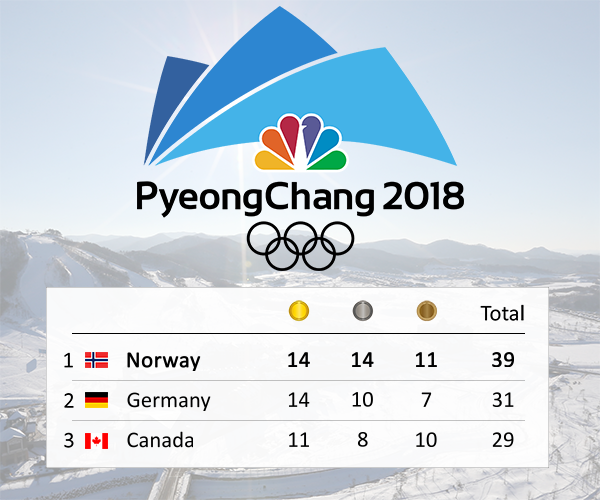
- This image was made with Adobe Photoshop personalized image.
- Includes 15 different text layers that change independently. (Countries and medal counts)
- Includes 3 different image layers that change as the country change spots. (Country Flags)
- Uses a live Olympic data feed.
- Image is updated every 5 minutes with the API.
Example 3
Premier League Table

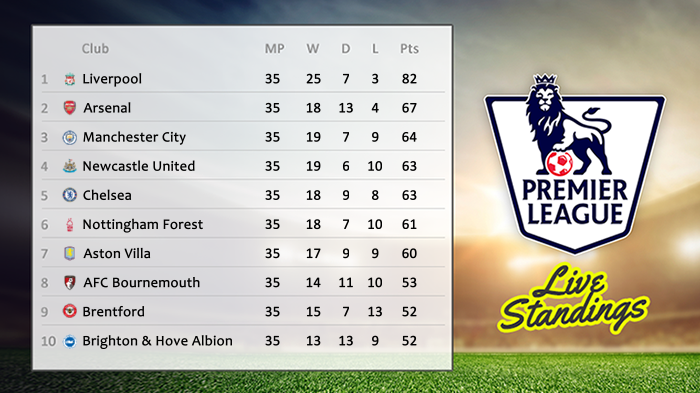
- This image was made with Adobe Photoshop personalized image.
- Includes 60 different text layers that change independently. (Team Names, Matches Played, Wins, Draws, Losses and Points Total)
- Includes 10 different image layers that show team crests
- Uses a live Premier League data feed.
- Image is updated every hour using the API.
Example 4
Live Stock Prices


- This image was made with Adobe Photoshop personalized image.
- Includes 12 different text layers that change independently. (Current Price, Change, % Change)
- Uses a live stock data feed.
- Image is updated every 30 seconds using the API.
If you have any questions or want to talk with someone on our team about setting up a Live Image for upcoming campaign, please contact us.